PayPal QR code generator for instant payments and transactions

PayPal processes over 22 billion transactions annually, yet many businesses still struggle with clunky payment collection that creates friction between customers and completed sales.
How PayPal QR codes simplify digital payments
As contactless payments become the preferred choice for consumers worldwide, businesses are shifting away from traditional checkout methods in favor of digital ones. This trend toward instant, scan-and-pay transactions has made QR codes an essential tool for modern payment collection. PayPal QR codes now offer businesses a simple way to create these instant payment links that customers can access with a quick scan.
PayPal QR codes help to ease payment struggles by connecting customers directly to your PayPal payment page, donation form, or checkout process with a simple scan.
This guide will cover everything from basic PayPal.me links to custom donation pages and product checkout flows. I'll also show you how to track which QR codes generate the most payments using dynamic QR codes that provide detailed analytics.
Real-world applications for PayPal payment codes
PayPal QR codes work particularly well for scenarios where traditional payment methods can create barriers or delays, like in public markets or garage sales. Check out our Google Reviews QR code guide for another way to connect offline experiences with online actions.
Small business transactions
Coffee shops, food trucks, and retail stores can use PayPal QR codes to accept payments without expensive card readers or complex POS systems.
Event ticket sales and merchandise
Musicians, artists, and event organizers can place QR codes on flyers and social media to sell tickets or merchandise directly through PayPal.
Nonprofit donations and fundraising
Charities and community organizations can use PayPal QR codes on printed materials, websites, and at events to collect donations instantly.
Service provider payments
Freelancers, consultants, and service providers can include PayPal QR codes in invoices and business cards for faster payment collection.
Building your PayPal QR code step-by-step
Creating a PayPal QR code takes just a few minutes once you have your PayPal link ready. The key is choosing the right type of PayPal link for your specific payment needs.
Access the QR generator
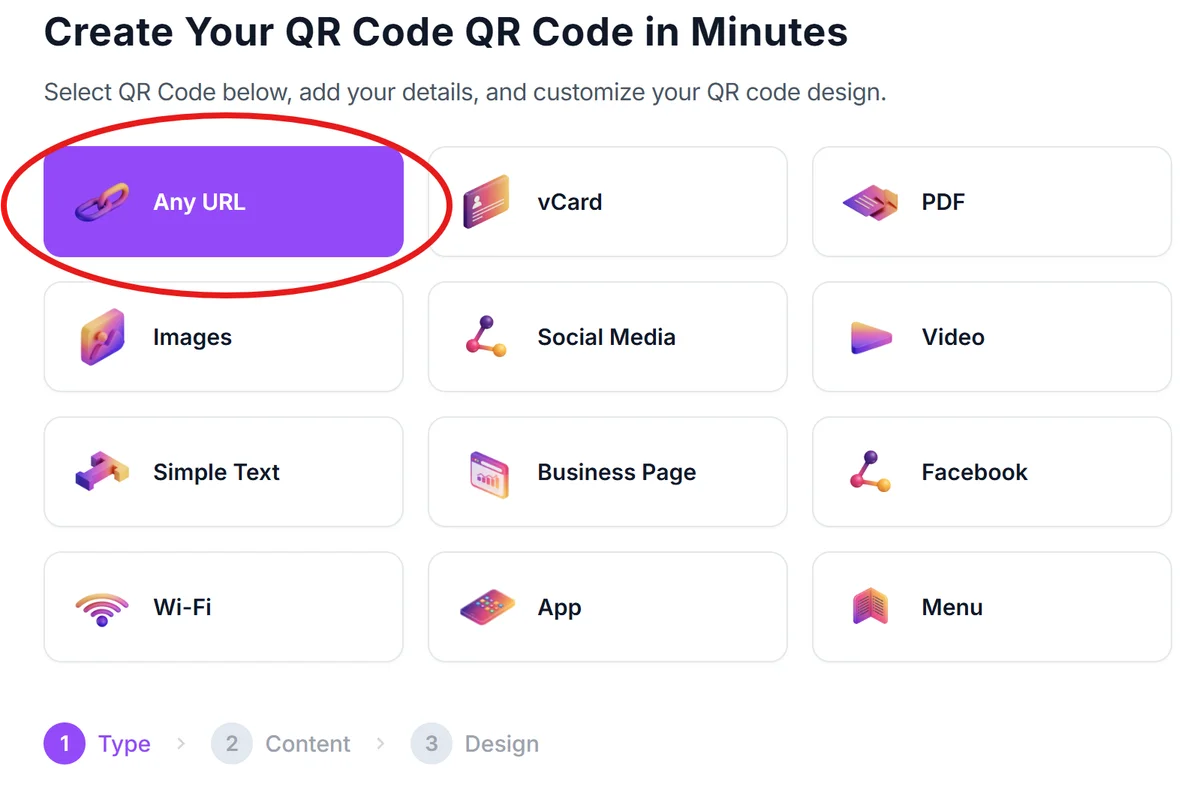
Visit qrcodeveloper.com and select 'URL' as your QR code type since PayPal links work as standard web URLs.
Prepare your PayPal payment link
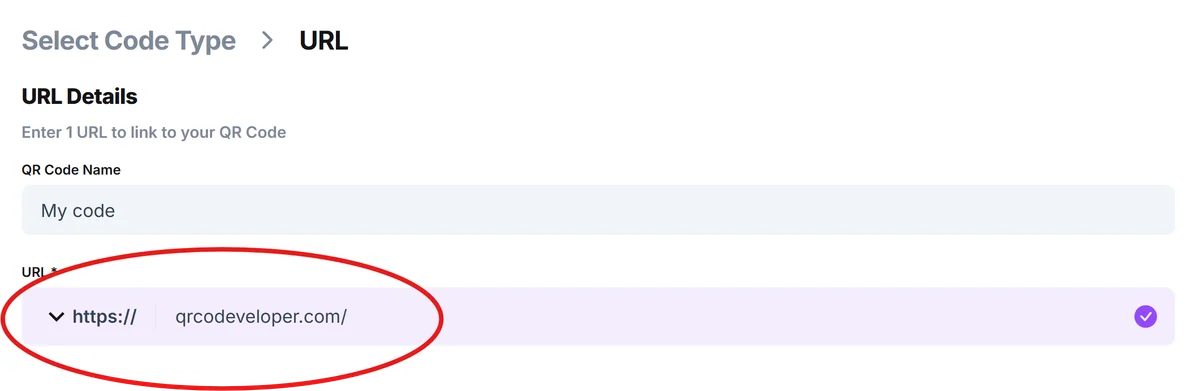
Get your PayPal.me link from your PayPal account, or create a custom payment link for specific products, services, or donation amounts through PayPal's tools.
Configure payment-specific design
Choose colors that match your brand or PayPal's blue theme. Add a logo if you're using this for business purposes, but ensure the QR code remains easily scannable by following proper QR code design principles.

Test payment flow thoroughly
Scan your QR code with multiple devices to ensure it opens PayPal correctly and leads to the right payment page or amount. Test both the PayPal app and mobile browser experiences.
Deploy with clear payment context
Place your QR code with clear instructions like 'Scan to pay with PayPal' or 'Donate via PayPal' so people understand exactly what they're scanning for.
Maximizing payment conversion with smart design
The difference between a successful QR code and one that gets ignored often comes down to presentation and context. Understanding the different types of QR codes can also help you choose the best approach for your payment needs.
Include the PayPal logo or colors near your QR code to build immediate trust and recognition, especially for customers who prefer PayPal over other payment methods.
Specify the payment amount or purpose clearly in text next to the QR code. 'Scan to donate $25' converts better than just 'Scan to donate' because it sets clear expectations.
Size your QR code appropriately for the scanning distance - at least 1 inch square for handheld materials, larger for signs or displays that people scan from further away.
Test your QR code with customers who have different PayPal account setups, including those who only use PayPal through their browser versus the mobile app, to ensure universal compatibility.
Frequently Asked Questions
Do customers need a PayPal account to pay through a PayPal QR code?
No, customers can pay with debit or credit cards through PayPal's guest checkout option, though having a PayPal account makes the process faster.
Can I create a PayPal QR code for a specific payment amount?
Yes, you can create PayPal.me links with preset amounts (like paypal.me/yourname/25.00) and generate QR codes for those specific payment amounts.
Will PayPal QR codes work internationally?
PayPal QR codes work wherever PayPal operates, but currency conversion and international transaction fees may apply depending on the sender and recipient locations.
How do I track which QR codes generate the most PayPal payments?
Use dynamic QR codes that provide scan analytics, and create unique PayPal.me links for different campaigns or locations to track performance through PayPal's reporting tools.
Are PayPal QR codes free to create and use?
Creating QR codes is free, and PayPal doesn't charge extra fees for QR code payments - you'll pay the same transaction fees as any other PayPal payment method.
Related Guides
Ready to create your QR code?
Generate custom QR codes in seconds - free and easy to use.
Create Free QR Code →