QR codes for animated GIFs - Share moving images instantly

Share animated GIFs instantly by converting them into scannable QR codes that work across all devices and platforms without file size limits.
How QR codes bring animated GIFs to life
A marketing manager needs to share an animated product demo GIF with potential clients at a trade show, but the file is too large to send via email and too cumbersome to transfer through messaging apps. Instead of struggling with file compression or cloud storage links, she generates a simple QR code that instantly delivers the full-quality animated GIF when scanned. Attendees can access the engaging visual content immediately on their phones without any downloading delays or compatibility concerns.
A QR code for animated GIFs solves these problems by creating a direct link to your GIF hosted online. When someone scans the code, they instantly access the full-quality animated image on their device. The QR code acts as a bridge between physical and digital spaces, letting you share moving content without worrying about file size limits or messaging app restrictions.
This approach works particularly well for marketing campaigns, art installations, and social media promotion. Rather than trying to embed large GIF files in emails or compress them for messaging apps, you can display a simple QR code that leads to the original, high-quality animation. Learn more about different content types in our types of QR codes guide.
Creative ways to share animated GIFs with QR codes
Animated GIF QR codes solve the challenge of sharing large moving images across different platforms and devices. They're particularly useful when you want to maintain image quality while reaching audiences in both digital and physical spaces. Check out our QR code flyer guide for more creative sharing ideas.
Social media marketing campaigns
Brands use GIF QR codes on printed materials to drive engagement with animated content that showcases products in action or tells brand stories.
Art galleries and exhibitions
Artists display QR codes next to static prints that reveal animated versions of their work, creating interactive gallery experiences. This approach transforms traditional gallery spaces into dynamic, multimedia environments.
Event promotion and entertainment
Concert venues and event organizers share animated promotional GIFs through QR codes on posters, tickets, and merchandise. These codes work similarly to event QR codes but specifically showcase moving promotional content.
Educational demonstrations
Teachers and trainers use GIF QR codes to share step-by-step animated tutorials that students can access on their own devices.
Building your animated GIF QR code
Creating a QR code for your animated GIF takes just a few minutes once you have your GIF hosted online.
Upload your GIF to a hosting platform
Upload your animated GIF to a reliable hosting service like Giphy, Imgur, or your own website. Copy the direct link to the GIF file - this is what your QR code will point to.
Visit the QR code generator
Go to qrcodeveloper.com and select the URL option since you'll be linking to your hosted GIF file.
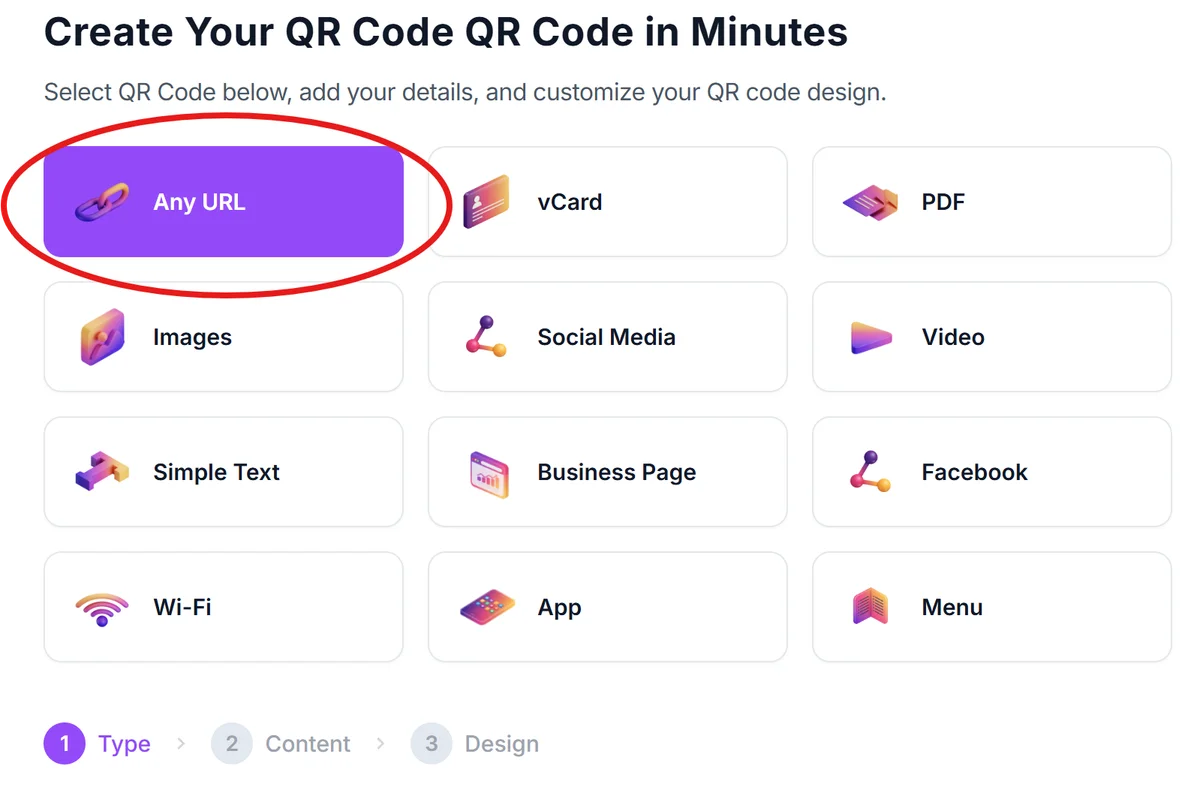
Paste your GIF URL
Enter the direct link to your hosted animated GIF. Make sure the URL ends with .gif and leads directly to the image file, not a webpage containing the GIF.

Customize the QR code design
Adjust the size, colors, and style to match your project. Consider using colors that complement your GIF's theme or your brand colors. For more customization ideas, check out our QR code design tips.

Test across multiple devices
Download your QR code and test it on different smartphones and tablets to ensure the GIF loads quickly and displays properly on various screen sizes.
Best practices for GIF QR code success
Follow these guidelines to ensure your animated GIF QR codes work reliably and create the best user experience.
Choose a reliable hosting platform with fast loading speeds. Giphy and Imgur are popular choices, but hosting on your own website gives you more control over the content.
Keep GIF file sizes under 5MB when possible to ensure quick loading on mobile networks. Compress your GIFs without losing essential visual quality. While QR codes themselves cannot directly store video files, as explained in our guide on whether QR codes can store video, they can efficiently link to hosted animated content.
Test the QR code on both iOS and Android devices since different browsers may handle GIF playback differently. Some older devices might have slower loading times.
Include a brief description near your QR code like 'Scan to see the animation' so people know what to expect when they scan the code.
Frequently Asked Questions
Yes, most modern smartphones and browsers will automatically play the GIF animation when the link loads. The playback depends on the user's device and browser settings.
Keep GIFs under 5MB for optimal loading on mobile networks. Larger files may take too long to load, causing users to lose interest before seeing your content.
Yes, if you host the GIF on your own website or use platforms like Giphy that provide analytics. You can see view counts and engagement metrics.
No, the QR code links directly to the hosted file. If the hosting service is unavailable, the GIF won't load. Choose reliable platforms or host important GIFs on your own server.
Creating basic QR codes is free. You only pay for GIF hosting if you use premium platforms or need advanced analytics and customization features.
Related Guides
Ready to create your QR code?
Generate custom QR codes in seconds - free and easy to use.
Create Free QR Code →